Dagger.jl Fast, Smart Parallelism
Easy parallel Seam Carving (scalable, Too)
Written by Felipe TomeTL;DR:
Seam carving is a tiny idea with a big Dynamic programming core; the hard part is scheduling dependencies without ruining parallelism.
Two useful Dynamic programming schedules: wavefront tiling (classic diagonal DAG) and triangles (striped two-phase overlap).
GPU support is backend-agnostic (CUDA / ROCm / oneAPI / Metal): same algorithm, different array type.
Benchmarks in this post: strong scaling @ 4096×4096, weak scaling ending at 2048×2048 on 16 threads.
If you have multiple GPUs, you can either pin pipelines per GPU or let Dagger place internal tasks within a GPU scope.
Introduction
You want an image resized. You don’t want it stretched into modern art. You don’t want it cropped into sadness. You want it fast. This is the seam-carving story: a delightfully simple idea with a not-so-cute dynamic-programming (DP) core… and a great excuse to let Dagger do what it does best: deal with the annoying parts of parallel programming so that you don't have to.
This post focuses on parallel seam carving. The implementation I’m using lives in a separate repo (DaggerApps) — consider it a pantry of interesting examples that will feed the blog posts we, the dagger developers, will create:
Seam carving in 30 seconds
Seam carving removes one pixel per row (a “vertical seam”), repeatedly, to shrink an image while trying to preserve “important” content.
The classic pipeline:
Energy map: score each pixel by how “important” it is (usually a cheap gradient).
Cumulative energy DP: find the minimum-cost top-to-bottom path where each cell depends on three cells from the row above.
Backtrack seam: recover the argmin choices to determine the minimal energy of each row.
Remove seam: build the next image (one column narrower).
Repeat for
kseams.
The math looks like this:
\[ E[y][x] = |I[y][x+1]-I[y][x-1]| + |I[y+1][x]-I[y-1][x]| \] \[ M[y][x] = E[y][x] + min(M[y-1][x-1], M[y-1][x], M[y-1][x+1]) \]Energy is happily parallel. The DP is… “parallel with feelings.”
Parallelism buffet (what’s easy vs what’s hard)
Energy: embarrassingly parallel; each pixel is independent.
DP: each cell depends on the previous row → the entire row can run in parallel, but rows must execute one-at-a-time (in-order).
Seam removal: also quite parallel (copy everything except one column per row).
Across seams: mostly sequential (the next seam depends on the image after removal).
So the real action is the DP: expose parallel work without breaking dependencies.
Enter wavefront scheduling (aka “diagonal progress”)
If you tile the DP grid, each tile depends only on tiles “above” it (and a little to the left/right). That means you can run tiles along diagonals (“wavefronts”) concurrently.
This is one of those problems where you can hand-roll a scheduler (Dagger will even allow you to do that in the near future)… but you shouldn’t have to.
Dagger makes the dependencies boring (compliment)
With Dagger, you express “this tile depends on those tiles” and let the runtime do the tedious part: scheduling the DAG on your available resources.
The wavefront DP in the implementation looks roughly like:
deps = (dp[ty-1,tx-1], dp[ty-1,tx], dp[ty-1,tx+1])
dp[ty,tx] = Dagger.@spawn dp_tile_wait(deps, E, M, B, y1, y2, x1, x2)
That’s the idea: state the dependency edges, keep the local compute simple.
Triangle scheduling (striped, two-phase, surprisingly effective)
Wavefront tiling is “classic DAG scheduling”: each DP tile waits on tiles from the previous row of tiles.
The triangle approach in the implementation takes a different tack:
Work in horizontal strips of height
tile_h.Split the image width into segments of width
base_w(derived fromtile_w, but forced to be at least2*tile_h).For each strip, do two phases:
Launch “down triangles” on odd segments (they expand as you go down the strip).
After those finish, launch “up triangles” on even segments (they shrink as you go down the strip).
The key idea: the expanding odd triangles intentionally overlap into neighboring segments so that when the even triangles run, their boundary dependencies (x±1 in the row above) are already computed. You get parallelism across segments without needing a full wavefront DAG for every tile.
Very rough sketch (each line is a row, triangles overlap):
odd segs (phase 1):   even segs (phase 2):
   \  /                   /\
    \/                   /  \
    /\                   \  /
   /  \                   \/
Here's a side-by-side of both schedules:
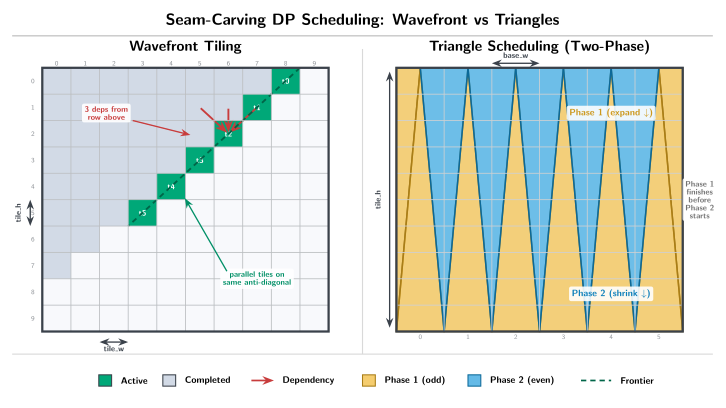
In code terms (simplified): phase 1 spawns dp_triangle_down! tasks for odd segments, waits; phase 2 spawns dp_triangle_up! tasks for even segments, waits; then move to the next strip.
Play along (interactive, low-stakes)
Create any given folder and have a viable Julia installation to run the following snippets.
Pick any directory you like and dev the seam-carving code from wherever you cloned DaggerApps.
REPL setup (once per environment)
From any folder you like (example uses a fresh scratch project):
mkdir -p seam-playground
cd seam-playground
julia --project=.
In the Julia package manager (]):
instantiate
# Point these at where you cloned DaggerApps (relative or absolute path both work).
dev /path/to/DaggerApps/apps/seam-carving
dev /path/to/DaggerApps/benchmarks/scripts
If you don’t want a project folder at all
import Pkg
Pkg.activate(; temp=true)
Pkg.develop(path="/path/to/DaggerApps/apps/seam-carving")
Pkg.develop(path="/path/to/DaggerApps/benchmarks/scripts")
Carve a toy “image” (so you can see what’s happening)
Carve a toy “image” (so you can see what’s happening)
This makes a synthetic matrix with a high-energy vertical stripe in the middle (the algorithm should try not to carve through it).
using Random
using DaggerSeamCarving

H, W = 64, 128
img = rand(Float32, H, W)
img[:, W÷2] .+= 10f0  # "important" stripe

out = DaggerSeamCarving.seam_carve_cpu_dagger_wavefront(img; k=20, tile_h=16, tile_w=16)
@show size(img) size(out)
Try swapping just the function name:
seam_carve_cpu_dagger_triangles(...)seam_carve_cpu_serial(...)(baseline, no Dagger)
You’ll get the same shape of output (width shrinks by k), but the runtime behavior changes a lot.
Switch to GPU device mode (any GPU backend)
Switch to GPU device mode (any GPU backend)
The “device” variant keeps seam selection/removal on the GPU, so the CPU mostly does orchestration.
This is intentionally not vendor-locked. Any KernelAbstractions backend should work — you just need to load the backend package you have and create the corresponding device array.
using DaggerSeamCarving

# Load ONE backend, depending on your GPU:
#   using CUDA      # NVIDIA
#   using AMDGPU    # AMD
#   using oneAPI    # Intel
#   using Metal     # Apple

img = rand(Float32, 1024, 1024)

img_dev =
    isdefined(Main, :CUDA) ? Main.CUDA.CuArray(img) :
    isdefined(Main, :AMDGPU) ? Main.AMDGPU.ROCArray(img) :
    isdefined(Main, :oneAPI) ? Main.oneAPI.oneArray(img) :
    isdefined(Main, :Metal) ? Main.Metal.MtlArray(img) :
    error("No GPU backend loaded. `using CUDA`/`AMDGPU`/`oneAPI`/`Metal` first.")

out = DaggerSeamCarving.seam_carve_gpu_dagger_device(img_dev; k=1)
@show typeof(out) size(out)
If you only remember one rule of thumb: GPU likes big enough problems. Tiny matrices make overhead look big.
Two knobs that actually matter (and one that’s mostly for fun)
Two knobs that actually matter (and one that’s mostly for fun)
The tiled variants expose parallel work by splitting the DP into blocks. These are the first things I tweak:
tile_h,tile_w: affects concurrency and overhead (too small → overhead city; too big → not enough parallel work).k: number of seams removed; remember that seams are mostly sequential, so hugekwill eventually hit the “can’t parallelize your way out of time” wall.seed: mostly for repeatability in toy experiments (the benchmark runner does this internally).
Try this: tile-size sweep (quick feel for sensitivity)
using DaggerSeamCarving

img = rand(Float32, 2048, 2048)
for tw in (64, 128, 256, 512)
    @time DaggerSeamCarving.seam_carve_cpu_dagger_wavefront(img; k=1, tile_h=tw, tile_w=tw)
end
Show me the pixels: 1000 seams on an NVIDIA GPU
I carved a real 4K landscape image on this machine’s NVIDIA GPU (RTX 4060 Laptop GPU), removing 1000 vertical seams (so the image shrinks a lot, but tries to keep the “busy” parts intact).
Before (3840×2160):

After (2840×2160, k=1000 seams removed):

The run that produced these images keeps seam-selection/removal on-device and only copies back once at the end.
Performance: measure, don’t vibe
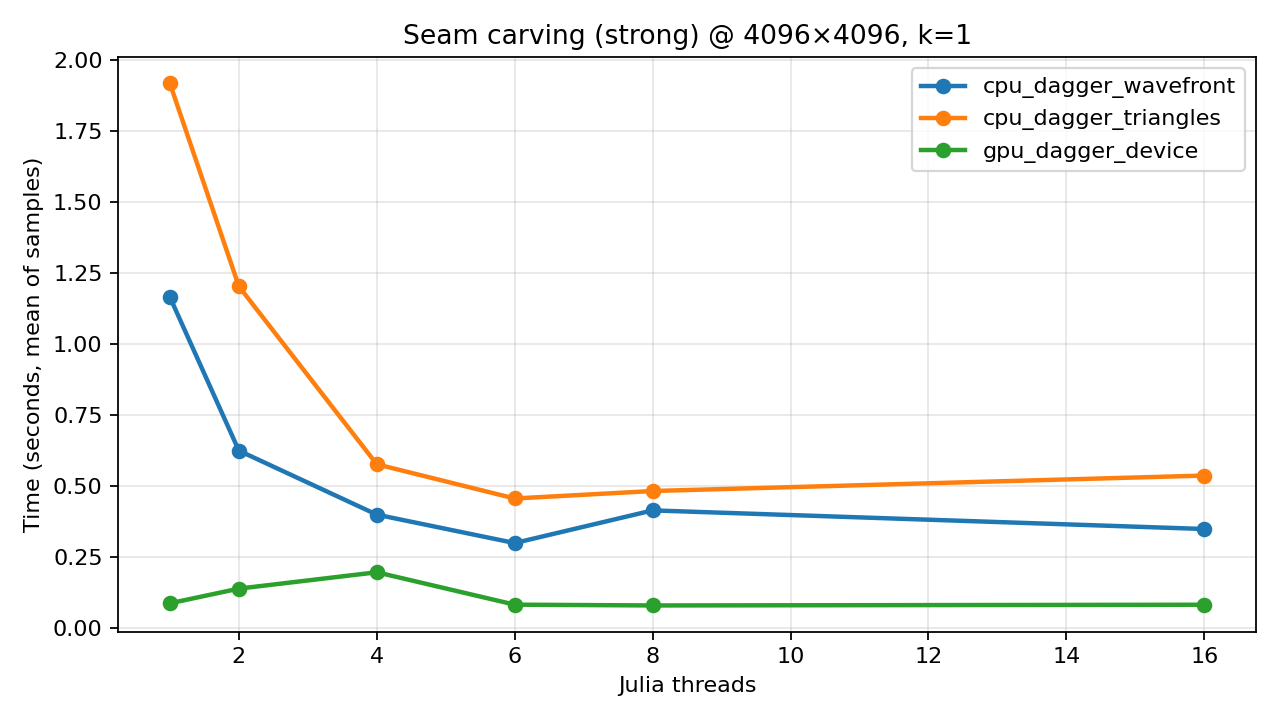
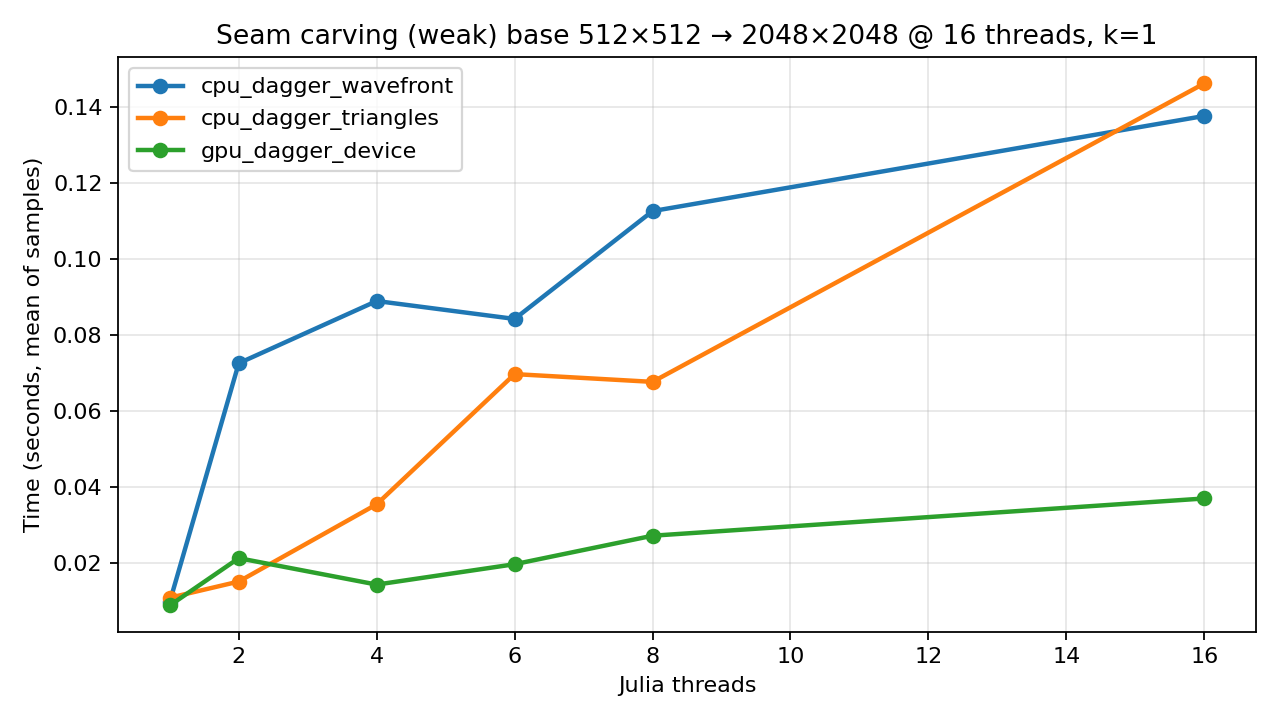
All benchmark timings use BenchmarkTools (with a warmup call so compilation time isn’t counted) and run single-node (one Julia process). CPU parallelism is controlled by Julia threads (-t / JULIA_NUM_THREADS).
The variants I care about here are:
cpu_dagger_wavefront: tiled DP scheduled as a wavefront (diagonal tile dependencies).cpu_dagger_triangles: a triangular/striped dependency structure that exposes more parallel work early, then tapers (still respects DP dependencies).gpu_dagger_device: GPU kernels + on-device seam backtrack + on-device seam removal (host mostly orchestrates).
Threads swept: 1, 2, 4, 6, 8, 16.
Strong scaling (fixed 4K)
Strong scaling keeps the problem size fixed and increases threads. The experiments we ran were 4096×4096 synthetic images with k=1.
Weak scaling (ends at 2048×2048 on 16 threads)
Weak scaling grows the problem size with the number of threads, trying to keep work-per-thread roughly constant. To make the “ends at 2048×2048 on 16 threads” requirement work cleanly, the benchmark uses a √threads rule:
Base size:
512×512at 1 threadSize at
tthreads:round(512 * √t)(square)End size at 16 threads:
512 * 4 = 2048→2048×2048
Repro (minimal commands)
If you want to reproduce the benchmark plots yourself:
# In the DaggerApps repo root (single-node):
# strong scaling @ 4096×4096, and weak scaling base=512×512 (sqrt rule → 2048×2048 at 16 threads).
for t in 1 2 4 6 8 16; do
  julia --project=benchmarks/scripts -t$t -e 'using DaggerAppsBenchmarks;
    # Optional: load ONE GPU backend before calling this (any one works):
    #   using CUDA      # NVIDIA
    #   using AMDGPU    # AMD
    #   using oneAPI    # Intel
    #   using Metal     # Apple
    #
    # Then `device=:auto` will pick it up. If no backend is loaded, GPU variants are skipped.
    run_seam_carving(runs=1, rows=4096, cols=4096, k=1, tile_h=256, tile_w=256,
                     variants=[:cpu_dagger_wavefront, :cpu_dagger_triangles, :gpu_dagger_device],
                     device=:auto, want_gpu=true, scenarios=:strong)'

  julia --project=benchmarks/scripts -t$t -e 'using DaggerAppsBenchmarks;
    run_seam_carving(runs=1, rows=512, cols=512, k=1, tile_h=256, tile_w=256,
                     variants=[:cpu_dagger_wavefront, :cpu_dagger_triangles, :gpu_dagger_device],
                     device=:auto, want_gpu=true, weak_scale=:sqrt, scenarios=:weak)'
done
Benchmark playground: run just one variant
Sometimes you don’t want “the whole buffet”, you want one line on a plot.
# Example: just wavefront (CPU), strong scaling @ 4096×4096, one timing sample
julia --project=benchmarks/scripts -t16 -e 'using DaggerAppsBenchmarks;
  run_seam_carving(runs=1, rows=4096, cols=4096, k=1, tile_h=256, tile_w=256,
                   variants=[:cpu_dagger_wavefront], device=:cpu, want_gpu=false, scenarios=:strong)'
Multi-GPU (same node): run the device-only GPU variant on 4 GPUs
In any case, if you have access to a multi-GPU machine, test the pipelines with it — let's say you want to only use the 4 GPUs you have available to process multiple images at once. Run this code and you will have it:
using Dagger
using DaggerSeamCarving

# Load ONE backend package:
# using CUDA      # NVIDIA
# using AMDGPU    # AMD (ROCm)
# using oneAPI    # Intel
# using Metal     # Apple

# Configure the right per-backend scopes + device-array constructor.
gpu_ids = [1, 2, 3, 4]
if isdefined(Main, :CUDA)
    gpu_scope  = Dagger.scope(; cuda_gpus=gpu_ids)
    gpu_scopes = [Dagger.scope(; cuda_gpu=i) for i in gpu_ids]
    to_device  = Main.CUDA.CuArray
elseif isdefined(Main, :AMDGPU)
    gpu_scope  = Dagger.scope(; rocm_gpus=gpu_ids)
    gpu_scopes = [Dagger.scope(; rocm_gpu=i) for i in gpu_ids]
    to_device  = Main.AMDGPU.ROCArray
elseif isdefined(Main, :oneAPI)
    gpu_scope  = Dagger.scope(; intel_gpus=gpu_ids)
    gpu_scopes = [Dagger.scope(; intel_gpu=i) for i in gpu_ids]
    to_device  = Main.oneAPI.oneArray
elseif isdefined(Main, :Metal)
    gpu_scope  = Dagger.scope(; metal_gpus=gpu_ids)
    gpu_scopes = [Dagger.scope(; metal_gpu=i) for i in gpu_ids]
    to_device  = Main.Metal.MtlArray
else
    error("Load a GPU backend first: `using CUDA` / `AMDGPU` / `oneAPI` / `Metal`.")
end

function carve_one(img_cpu::AbstractMatrix{Float32}; k::Int=10)
    img_gpu = to_device(img_cpu)  # allocated on the GPU selected by the task's scope
    out_gpu = DaggerSeamCarving.seam_carve_gpu_dagger_device(img_gpu; k=k)
    return Array(out_gpu)         # bring back to CPU (optional)
end

imgs = [rand(Float32, 2048, 2048) for _ in 1:16] # 16 independent images

Dagger.with_options(; scope=gpu_scope) do
    tasks = map(enumerate(imgs)) do (i, img)
        Dagger.@spawn scope=gpu_scopes[mod1(i, 4)] carve_one(img; k=10)
    end
    results = fetch.(tasks)
end
What this does: you explicitly pin each whole image pipeline to a specific GPU (scope=gpu_scopes[...]). That gives you predictable placement and tends to minimize cross-GPU movement.
If you’d rather not use Dagger.@spawn at the outer level, you can just run a loop and let the internal Dagger.@spawn calls inside seam_carve_gpu_dagger_device get scheduled onto whatever GPU is available within the 4‑GPU scope.
Important caveat: because seam_carve_gpu_dagger_device(...) blocks (it fetches at the end), you still need some way to keep multiple pipelines “in flight” if you want to use all 4 GPUs. The simplest is Julia threads:
# Same `gpu_scope` as above (cuda_gpus / rocm_gpus / intel_gpus / metal_gpus)

carve_one_auto(img_cpu::AbstractMatrix{Float32}; k::Int=10) =
    Array(DaggerSeamCarving.seam_carve_gpu_dagger_device(img_cpu; k=k))

Dagger.with_options(; scope=gpu_scope) do
    results = Vector{Matrix{Float32}}(undef, length(imgs))
    Threads.@threads for i in eachindex(imgs)
        results[i] = carve_one_auto(imgs[i]; k=10)
    end
    results
end
Difference in practice
Pinned outer spawns (first snippet): you choose the GPU per image; easiest way to guarantee “GPU 1 gets images 1,5,9,…”. Good when you want reproducibility and clean per-device accounting.
Threaded loop + internal spawns (second snippet): you write no outer Dagger tasks; Dagger schedules the internal tasks onto the GPUs allowed by
gpu_scope. This is less deterministic but more “hands-off”.
Closing thought (and takeaways)
Seam carving is a great example of “parallelism with constraints”: the work is local, but not independent. Dagger is a great fit for that middle ground — enough structure to encode dependencies cleanly, without turning your code into a homegrown scheduler. The point here is not that any stated problem will run and scale well, but any well thought parallel algorithm will require no extra effort to implement, the pipeline from parallel algorithm design to valid implementation should be effortless.
So the main takeaways are:
CPU scaling needs enough work to amortize scheduler/overhead; the seam-per-seam loop also limits “perfect” scaling.
Wavefront vs triangles is mostly “shape of available work”: how many independent tiles/regions exist at each frontier and how much waiting you induce.
GPU vs CPU threads: GPU throughput is driven by kernel occupancy and problem size; CPU threads mostly orchestrate kernels.
You can roll your own seam carving in 1–2 hours with Dagger: write the local kernels, express dependencies with
@spawn, and you get single-node scaling with little ceremony.Distributed is next: a multi-node version is a natural extension (and I’ll write a good distributed application for it in a future post). The same structure here can run in a distributed Dagger session too — you “just” add workers and scopes and make sure each worker has the right GPU backend loaded, it will not scale well but it will run.
Website built with Franklin.jl and the Julia programming language.